Site inspection app
Run inspections with real evidence attached
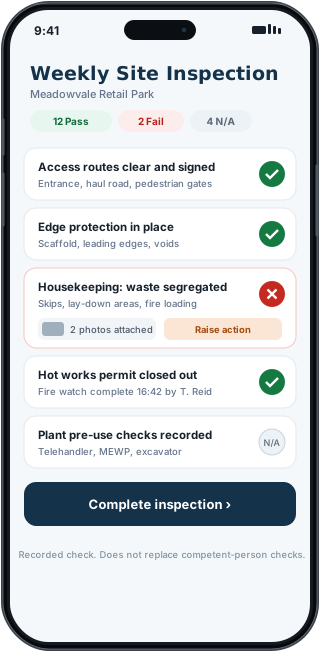
Repeatable checklists with pass, fail or N-A, photo evidence on any item, and a corrective action raised straight from a failed check.
A tick-sheet on its own proves very little
Paper inspection sheets and photos in a separate folder are hard to reconcile later. When something is questioned, the evidence and the check are in different places.
FieldRadar keeps the checklist, the photos and the resulting actions together. A failed item becomes a tracked corrective action in a couple of taps. Export the inspection as a PDF record. Check it before you rely on it.
How FieldRadar helps
Ready-made templates
Daily walk, fire door, scaffold and edge protection, RAMS compliance, pre-handover and environmental checks, plus a weekly site inspection.
Pass, fail or N-A with photos
Mark each item and attach photo evidence where it matters. Add notes hands-free with a voice note.
Corrective actions
Raise an action straight from a failed check and track it through to close-out with the rest of your defects.
Recurring schedules
Set an inspection to repeat, so weekly and daily checks are never forgotten.
What it does not do
FieldRadar records and evidences your inspections. It does not replace a competent person carrying out the inspection, or statutory inspection requirements. The templates are a starting point you adapt to your site and duties.
Common questions
Can I add my own checklist items?
You run the built-in templates and record notes and evidence against them. Fuller custom-template editing is on the roadmap.
Does the inspection export as a record?
Export an inspection PDF with results, photos and a note that it does not replace competent-person checks. Check the output before relying on it.