Construction snagging app
Snag it on the plan, close it out with evidence
Walk the unit, pin each snag exactly where it is, attach a photo, and hand over a clean list. FieldRadar keeps your snagging and your close-out evidence in one place.
Snagging is where admin piles up
A pre-handover walk throws up dozens of snags in an hour. Photographed on a phone, half of them lose their location by the time you are back in the cabin. Then someone rebuilds a snag list in a spreadsheet, chases subcontractors by message, and tries to prove each one was fixed.
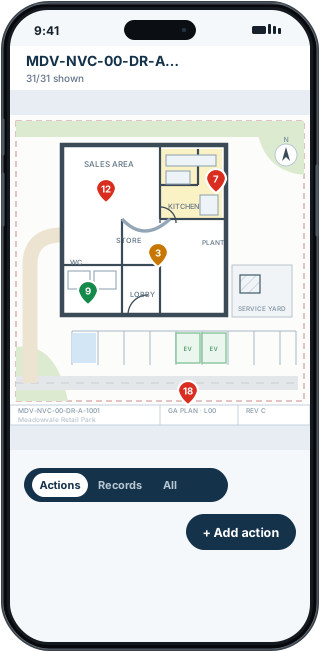
FieldRadar makes the walk the record. Press and hold on the drawing to drop a snag exactly where it is, colour-coded by status, add a before photo and a voice note, and move on. Nothing gets lost and nothing is typed up twice.
How FieldRadar helps
Pin snags on the drawing
Press and hold on your plan to place a snag at the exact location, marked open, in progress or closed.
Before and after evidence
Attach photos, annotate them with arrows and circles, and add a voice note so the detail is captured hands-free.
Filter and bulk close
Filter by status, priority or trade, and close out multiple snags at once as the subcontractor completes them.
PDF snag-list output
Export an open-defects PDF with plan locations and photos, then check it before issue. Company branding comes with Pro.
What it does not do
FieldRadar records and evidences your snagging. It does not carry out the inspection for you or replace a competent person's judgement on whether a snag is acceptable. The browser dashboard supports office review, bulk updates, collaboration and reporting.
Common questions
Can I share the snag list with a subcontractor?
Yes. Export a per-contractor PDF and send it to them; they do not need the app or an account to read it.
Does it work without signal?
Yes. FieldRadar is offline-first. You can snag a whole unit with no connection and it syncs when you are back online.