Defect management
Track every defect through to close-out
Capture a defect against its plan location, assign it, set a priority and due date, and keep the photo evidence that proves it was resolved.
Defects fall through the cracks between capture and close-out
Knowing there are defects is easy. Knowing which are open, which are overdue, who owns them and whether the fix was evidenced is the hard part, especially across several jobs.
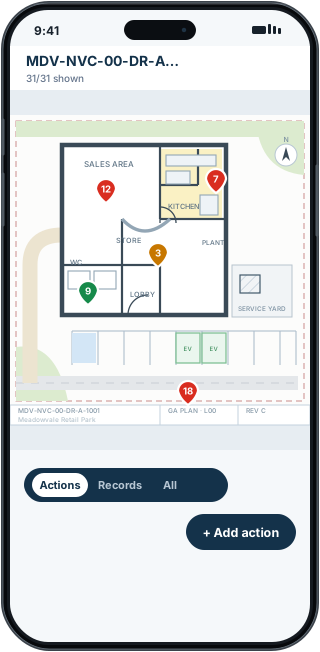
FieldRadar keeps each defect located on the plan, with a status, a priority, an owner and its evidence, so nothing slips between the site walk and handover.
How FieldRadar helps
Located and colour-coded
Every defect sits on the drawing, marked open, in progress or closed, so the state of the job is visible at a glance.
Assign and prioritise
Set a responsible contractor, a priority and a due date. Surface overdue and high-priority items quickly.
Evidence the fix
Before and after photos against the plan location settle disputes and prove close-out.
Report and hand over
Export open-defects, overdue and completed-evidence reports as PDF for the client or your own records.
What it does not do
FieldRadar helps you record, track and evidence defects. It does not decide whether a defect is acceptable or sign off remedial work for you. The browser workspace supports office review on the projects you have access to. Company-wide access across every project comes with a Team plan.
Common questions
Can I see overdue defects?
Yes. You can filter the action register by overdue and high priority, and reports include an overdue preset.
Does it handle more than defects?
Yes. The same capture flow handles safety findings, tasks, progress notes and dilapidation records, all on the plan.